The platform
Crew and devices
The crew and the phones they carry in one place, from who is online right now to approving the new handset a washer just picked up.

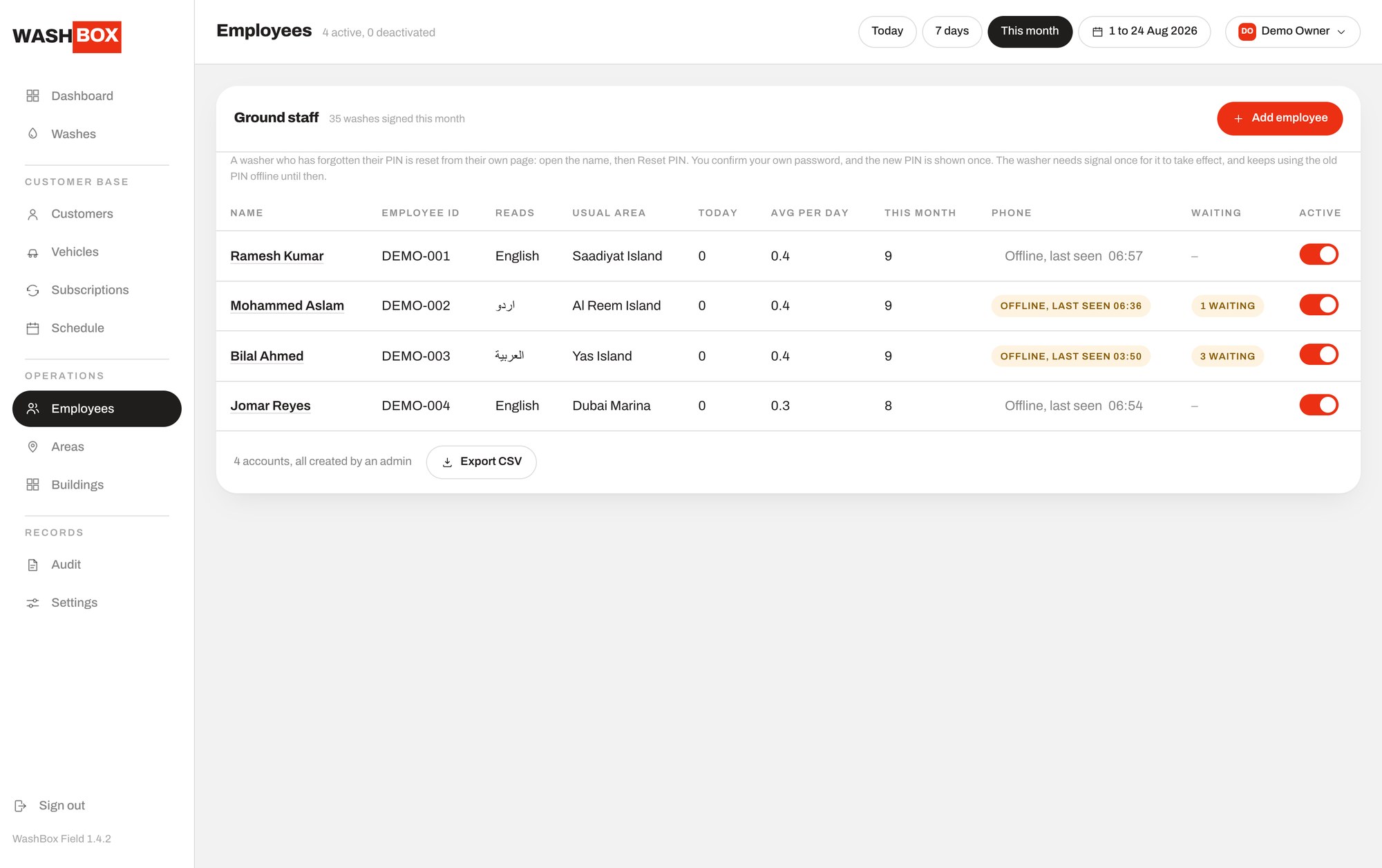
The crew list shows each washer with their presence, online when heard from inside six minutes, idle inside the hour, offline after that with the time last seen, their usual area, and whether their account is active. An active toggle turns an account on or off, and an owner can export the crew to CSV. A washer types a code that is globally unique across the platform through a per-company prefix, so the field app never needs a company selector on a screen meant to be used in a basement.
Open a washer and their phone is a first-class part of the record. A washer's first handset is approved automatically, so onboarding is nothing more than signing in, but any later phone starts unapproved and needs the office to approve it. That is the control that matters when a phone is lost or a washer leaves: revoking a device ends its sessions in the same moment, so it is signed out immediately rather than at the next login.
When a washer forgets their PIN, the office resets it, and the reset is deliberately guarded. The admin has to re-enter their own password to confirm, so a walk-up to an unlocked panel cannot change a washer's credentials. The new PIN is shown once and cannot be looked up again, and if the account was locked from failed attempts, that lockout is cleared in the same step.
There is a detail that only matters in the places this app is built for. The new PIN takes effect once the phone reaches the network, because the handset keeps the old one for unlocking in a basement with no signal. It is the kind of thing that would be a support ticket if it were not stated, and the panel states it on the screen.
The washer app itself runs in four languages, English, Arabic, Hindi and Urdu, so the crew uses it in the language they actually speak, while the office panel and the resident app are English and Arabic with full right-to-left layout.
- Presence per washer: online, idle or offline with the time last seen
- First handset approved automatically; any later phone needs office approval
- Revoking a device ends its sessions at once, signing the phone out immediately
- PIN reset requires the admin to re-enter their own password, and shows the new PIN once
- A reset clears a lockout, and takes effect once the phone reaches the network
- Washer app in English, Arabic, Hindi and Urdu; crew export to CSV
Frequently asked questions
What stops a washer signing in on any phone they like?
The first handset on an account is approved automatically, but every later phone starts unapproved and only the office can approve it, so a washer cannot silently move their access to a second device.
A washer left. How do I cut off their phone?
Revoke the device. Its sessions end in the same moment, so the phone is signed out immediately rather than staying valid until it next tries to log in.
Can someone reset a washer's PIN from an unattended panel?
No. A PIN reset requires the admin to re-enter their own password to confirm, so an unlocked screen alone cannot change a washer's credentials. The new PIN is shown once.
What languages does the crew's app support?
The washer app runs in English, Arabic, Hindi and Urdu. The office panel and the resident app are English and Arabic with full right-to-left layout.

Abu Dhabi City & Al Reem Island
Ask for a platform walkthrough
Tell us where the car is and what it needs. We confirm the slot and the price on the call.
+971 58 540 1230 WhatsApp